서론
요구사항은 다음과 같다.
- 어떤 엔티티를 일반 사용자, 관리자 모두 생성할 수 있지만, 관리자만 이 데이터의 검증 여부를 설정하여 생성할 수 있다.
// Graphql schema 예
createEntityInput {
  name: String! // 필수값
  isVerified: Boolean // 선택값, 관리자만 설정가능, 기본값은 false
}
일반 유저가 검증여부를 설정한 경우 서비스 로직에서 조용히 무시하는 방법은 직관적이지 않고 디버깅의 어려움을 유발할 수 있기에, 이 경우에 오류를 던지는 방향으로 설계를 시작했다.
그러러면 요청의 특정 인풋 필드가 유효한 값을 가지는 경우 유저의 권한을 체크해야 하는데, 이 로직을 리졸버(GraphQL의 컨트롤러와 비슷하다) 또는 서비스에 직접 구현하기에는 비슷한 코드가 중복되는 분산으로 인하여 관리가 어렵고 비효율적이라고 판단했다. 따라서 Nest.js의 Enhancer을 활용하여 AOP(Aspect Oriented Programming) 를 적용해보았다.
작업하기
이를 구현하는 여러 방법 중 한 가지를 선택할 때의 근거는 과도한 패치보다는 제공되는 기능의 본 목적에 부합하게 사용하는 것이었다. 그리고 두 곳 이상에서 설정(예: DTO / 리졸버 등)할 필요가 없도록 하여 간단하게 사용가능하게 만들어서 휴먼 에러를 줄이려고 했다.
Nest.js에는 예외필터, 파이프, 가드, 인터셉터, 커스텀 데코레이터를 포함하는 Enhancer 기능을 제공한다.
예외가 발생하기 전 사전 처리이기에, Exception Filter는 제외했다.
권한을 체크하기 위해서는 요청 컨텍스트에서 유저 정보를 추출해야 했기에, guard 와 interceptor(before 단계)가 적합하다고 판단했다.
API 는 일반 유저도 요청은 가능하지만, 인풋 필드 일부에 대해서 보다 세밀하게 권한을 제어하는 AOP 를 구현하기 위해서 guard보다는 interceptor(before단계)가 적합하다고 판단했다.
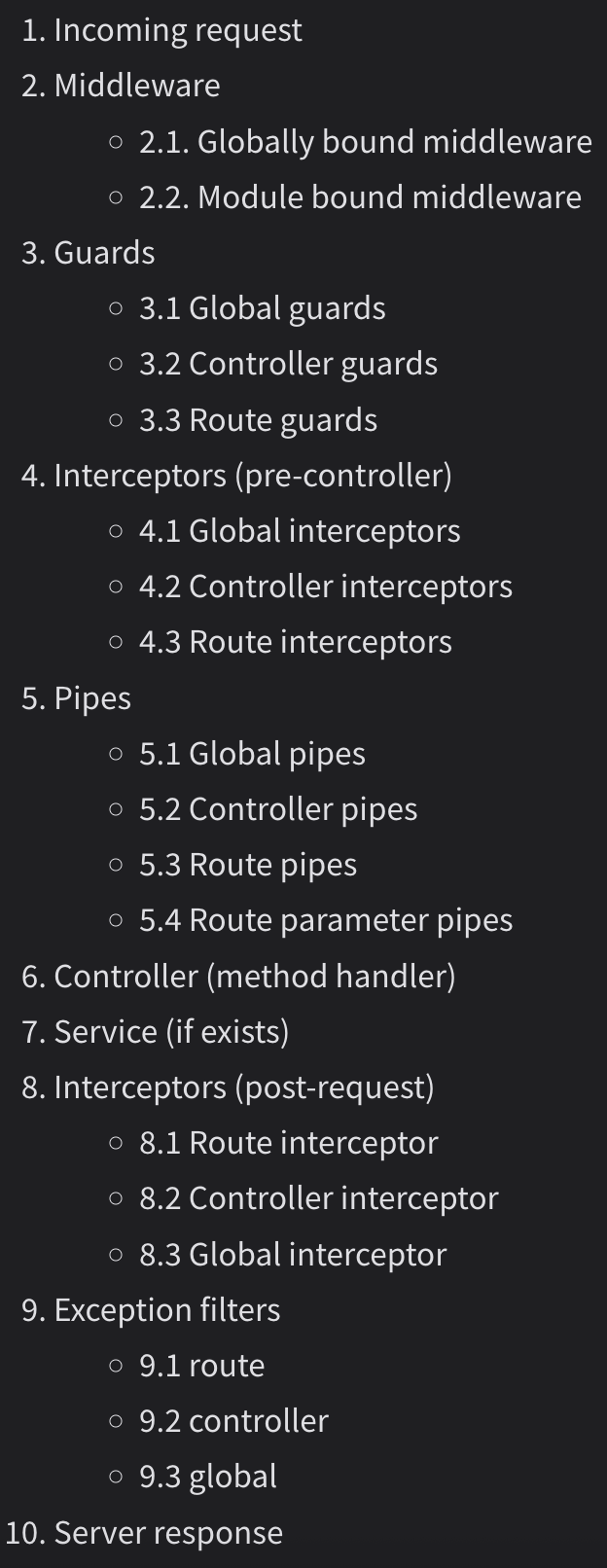
인터셉터는 정적으로 정의가능 할 경우 미리 정의된 하나의 클래스로 구현할 수도 있다. 이번에는 인터셉터에 커스텀 데이터를 전달하기 위해 팩토리 함수를 정의하고 이 함수(AdminOnlyInputFields)가 호출될 때마다 인터셉터 클래스가 만들어지도록 했다. 단 mixin을 통해 함수가 아닌 클래스를 반환함으로써 Nest.js의 DI 를 추후에 활용가능하도록 했다.
- 일반적인 케이스
// cats.controller.ts
@UseInterceptors(LoggingInterceptor)
export class CatsController {}


// logging.interceptor.ts
import { Injectable, NestInterceptor, ExecutionContext, CallHandler } from '@nestjs/common';
import { Observable } from 'rxjs';

@Injectable()
export class LoggingInterceptor implements NestInterceptor {
  intercept(context: ExecutionContext, next: CallHandler): Observable<any> {
    // ....
  }
}- 런타임(리졸버가 로드되는 시점)에 결정된 파라미터를 받는 Interceptor
// foo.resolver.ts

@UseInterceptors(AdminOnlyInputFields(['isVerified'])) // 이 부분!
@Mutation(() => fooPayloadDto)
async foo(
@Args('input') input: fooInputDto,
): Promise<fooPayloadDto> {
 return await this.barService.baz(input);
}

// admin-only-input.interceptor.ts

import { CallHandler, ExecutionContext, Injectable, mixin, NestInterceptor, Type } from '@nestjs/common'
import { GqlExecutionContext } from '@nestjs/graphql'
import { GraphQLError } from 'graphql'
import { Observable } from 'rxjs'

export const AdminOnlyInputFields = (
  fields: string[],
): Type<NestInterceptor> => {
  @Injectable()
  class AdminFieldSecurityInterceptor implements NestInterceptor {
    async intercept(
      context: ExecutionContext,
      next: CallHandler,
    ): Promise<Observable<any>> {
      const gqlContext = GqlExecutionContext.create(context)
      const { input } = gqlContext.getArgs()
      const user = gqlContext.getContext().currentUser

      if (!input) return next.handle()

      if (fields.length > 0 && !user.isAdmin) {
        for (const field of fields) {
          if (input[field] !== undefined && input[field] !== null) {
            throw new GraphQLError(
              `'${field}' 필드는 관리자만 설정할 수 있습니다.`,
            )
          }
        }
      }

      return next.handle()
    }
  }

  return mixin(AdminFieldSecurityInterceptor)
}
한계
필드명을 문자열로 넘겨주기 때문에, 오타가 있으면 의도대로 동작하지 않는다.
다른 시도들
실패한 방법과 그 이유도 정리해보았다. 인풋 DTO 클래스 필드에 데코레이터를 달아 관리자전용 필드임을 나타내는 메타데이터를 설정하고, 인터셉터에서 해당 메타데이터가 설정된 필드를 찾아서 권한을 체크하는 방식을 시도했었다. 다음은 코드 스니펫이다.
// foo-input.dto.ts
import { Field, InputType } from '@nestjs/graphql'

@InputType('fooInput')
export class fooDto {
  @Field(() => String)
  name: string

  @AdminOnlyInput() // 이 데코레이터를 사용하여 관리자가 아닌 유저가 isVerified를 요청하면 오류 발생
  @Field(() => Boolean, {
    nullable: true,
    defaultValue: false,
  })
  isVerified: boolean
}

// admin-only-input.decorator.ts
import { SetMetadata } from '@nestjs/common';

export const ADMIN_ONLY_FIELDS_KEY = 'admin_only_fields';

export function AdminOnly() {
  return (target: any, propertyKey: string) => {
    Reflect.defineMetadata(ADMIN_ONLY_FIELDS_KEY, true, target, propertyKey);
  };
}

// admin-only-input.interceptor.ts
@Injectable()
export class AdminOnlyInterceptor implements NestInterceptor {
  constructor(private readonly reflector: Reflector) {}

  intercept(context: ExecutionContext, next: CallHandler): Observable<any> {
    const ctx = GqlExecutionContext.create(context);
    const args = ctx.getArgs(); // 실제 유저가 보낸 데이터 { name: "...", isVerified: true }
    const inputData = args.input || args;
    const adminOnlyFields = Reflect.getMetadata(
      ADMIN_ONLY_FIELDS_KEY,
      Object.getPrototypeOf(inputData)
    );

    console.log(typeof inputData); // Object
    console.log(adminOnlyFields); // [](빈 배열)

    // 따라서 이 블록은 절대 실행되지 않는다.
    if (adminOnlyFields) {
      // ... 권한 체크 로직 ...
    }

    return next.handle();
  }
}
이 코드는 의도대로 동작하지 않았는데, 근본적인 이유는 adminOnlyFields가 항상 빈 배열이기 때문이다. typeof로 inputData 의 타입을 확인해보면 fooInputDto 가 아니라 Object 타입이었다. 즉 데코레이터를 달아놓은 fooDto 클래스와의 연결고리가 없기 때문에 Reflect.getMetadata는 를 통해 메타데이터를 얻을 수 없었다. 참고했던 작업은 rediscacheable 데코레이터인데, 이 때는 메소드에 메타데이터를 설정했기에, 런타임에도 동작할 수 있었다.
Object 타입인 이유는 인터셉터의 before 단계는 class-transformer의 PlainToClass가 실행되어 객체가 DTO 인스턴스로 변환되는 시점인 Pipe(파이프) 단계의 이전이기 때문이다.
참고
요청 라이프사이클
https://docs.nestjs.com/faq/request-lifecycle
Documentation | NestJS - A progressive Node.js framework
Nest is a framework for building efficient, scalable Node.js server-side applications. It uses progressive JavaScript, is built with TypeScript and combines elements of OOP (Object Oriented Programming), FP (Functional Programming), and FRP (Functional Rea
docs.nestjs.com
Nest.js 데코레이터
https://docs.nestjs.com/custom-decorators
Documentation | NestJS - A progressive Node.js framework
Nest is a framework for building efficient, scalable Node.js server-side applications. It uses progressive JavaScript, is built with TypeScript and combines elements of OOP (Object Oriented Programming), FP (Functional Programming), and FRP (Functional Rea
docs.nestjs.com
Nest.js 인터셉터
https://docs.nestjs.com/interceptors
Documentation | NestJS - A progressive Node.js framework
Nest is a framework for building efficient, scalable Node.js server-side applications. It uses progressive JavaScript, is built with TypeScript and combines elements of OOP (Object Oriented Programming), FP (Functional Programming), and FRP (Functional Rea
docs.nestjs.com
리플렉션과 메타데이터
https://docs.nestjs.com/fundamentals/execution-context#reflection-and-metadata
Documentation | NestJS - A progressive Node.js framework
Nest is a framework for building efficient, scalable Node.js server-side applications. It uses progressive JavaScript, is built with TypeScript and combines elements of OOP (Object Oriented Programming), FP (Functional Programming), and FRP (Functional Rea
docs.nestjs.com
'배운 것들 > 그 외' 카테고리의 다른 글
| Elasticsearch 로 기업 검색 구현하기 (2) | 2025.11.06 |
|---|---|
| 스탬피드 캐싱 방지하기 (6) | 2025.07.24 |
| GraphQL 요청당 필드 캐싱으로 인한 이슈 해결 (1) | 2025.06.27 |
| Elasticsearch 를 활용한 프로젝트를 경험하면서 느낀 점 (2) | 2025.06.26 |
| TypeScript 프로젝트에서 외부 파일을 이용할 때 경로 처리 (3) | 2025.04.12 |